Storefront accelerator
Storefront accelerator is a Next.js-based storefront accelerator designed to help developers quickly build and deploy e-commerce websites. It does not cover all of Centra's functionality, but it covers many of the most common features in e-commerce:
- Product listing pages with categories, simple filters and search
- Product details page
- Basket sidebar
- Localization
- Customer sign in, register, subscriptions & order history
- Bundles
- Checkout address & delivery selection (Using Ingrid with Centra as fallback)
- Payments
- Checkout success and failure pages
The code is hosted under an MIT license on github at github.com/centrahq/storefront-accelerator. You can use it as inspiration, reference implementation or fork it in its entirety and use it as a starting point for your project.
Implementation details
- Uses Next.js, Typescript & Tailwind
- Server-side rendering (SSR)
- Caching and revalidation strategies for faster page loads
- Multi-language support for localised content and internationalization (i18n)
- GraphQL tooling to automatically generate TypeScript types from our schema and queries
Caching
We use Next.js’s request cache with on-demand cache invalidation via webhooks. The cache acts as a middle layer between the user and the Storefront API, reducing the need for frequent API calls. When a user requests a page, the server first checks the cache:
- If the data is not cached, it is fetched from Storefront API, stored in the cache, and then served.
- If the data is cached, it is used immediately. If the cache is stale, the server fetches fresh data in the background and updates the cache for future requests.
- When a webhook is triggered, the server purges the affected cache entry.
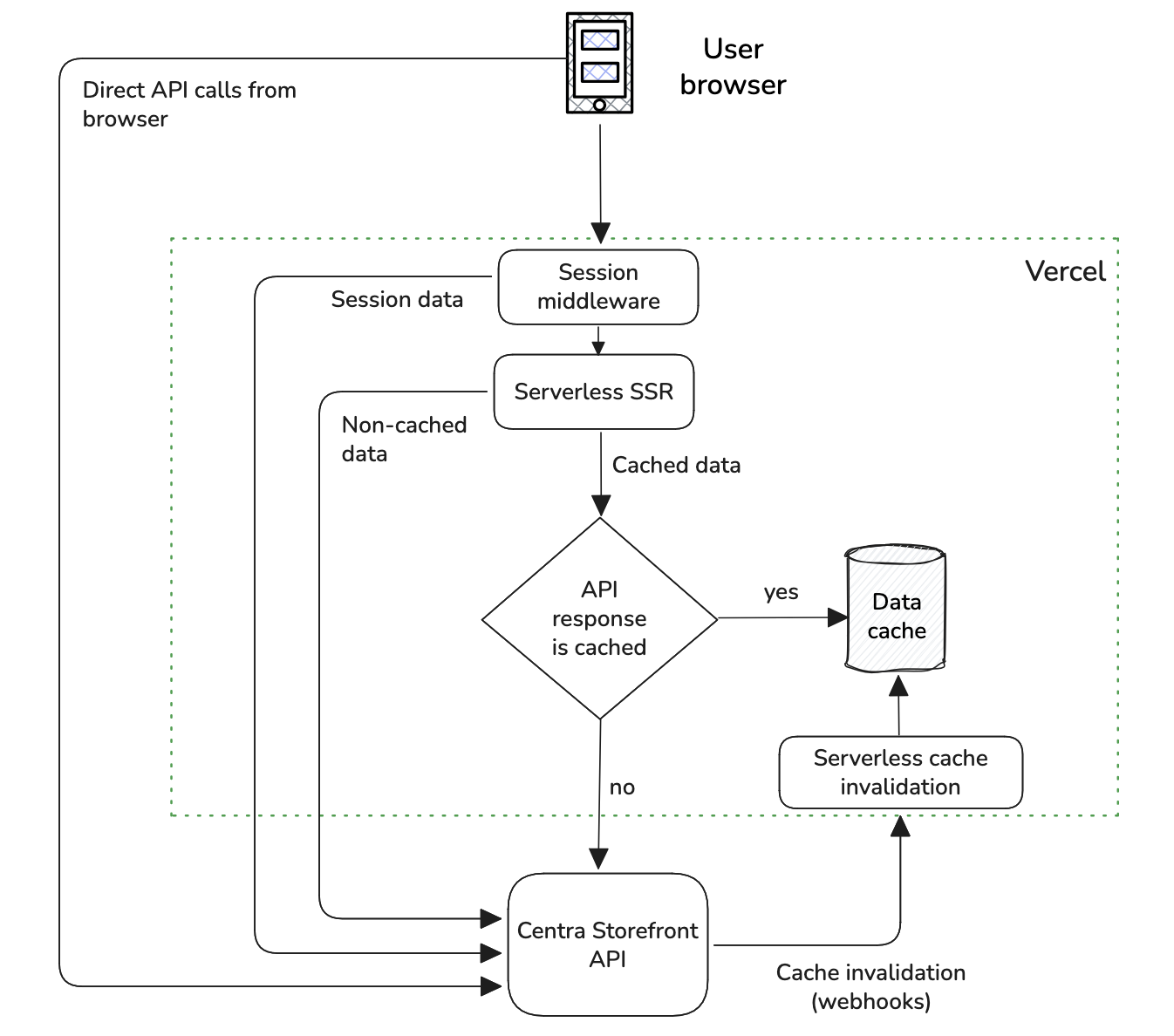
The approach differs in two fundamental ways from what has historically often been done with Checkout API.
- No full-page caching - Server side rendering is very fast
- No up-front cache build - A cache built "on demand" performs very well with Storefront API and reduces implementation complexity a lot
It works because providers like Vercel, Netlify and Cloudflare provide servers and caches very close to the end user. So while a few ms extra might be added because the page needs to be built this is often more than compensated by the reduction in network latency.
What do we cache
- Product details data (hours)
- Product lists (hours)
- Countries, states & languages (days)
- Root categories, to display on header (days)
- Category details (days)
Read more about cache profiles here.
Routing
To support internationalization (i18n) and localization (l10n), the page uses URL prefixes in the format /languageCode-countryCode (e.g., /en-US, /fr-FR) as the root of every route.
Provides better SEO through distinct, crawl-able locale-specific pages.
Middleware
On any interaction with the page the middleware will check and adjust the session and routing. Session cookie is set to 1 hour, API token cookie is set for 1 month.
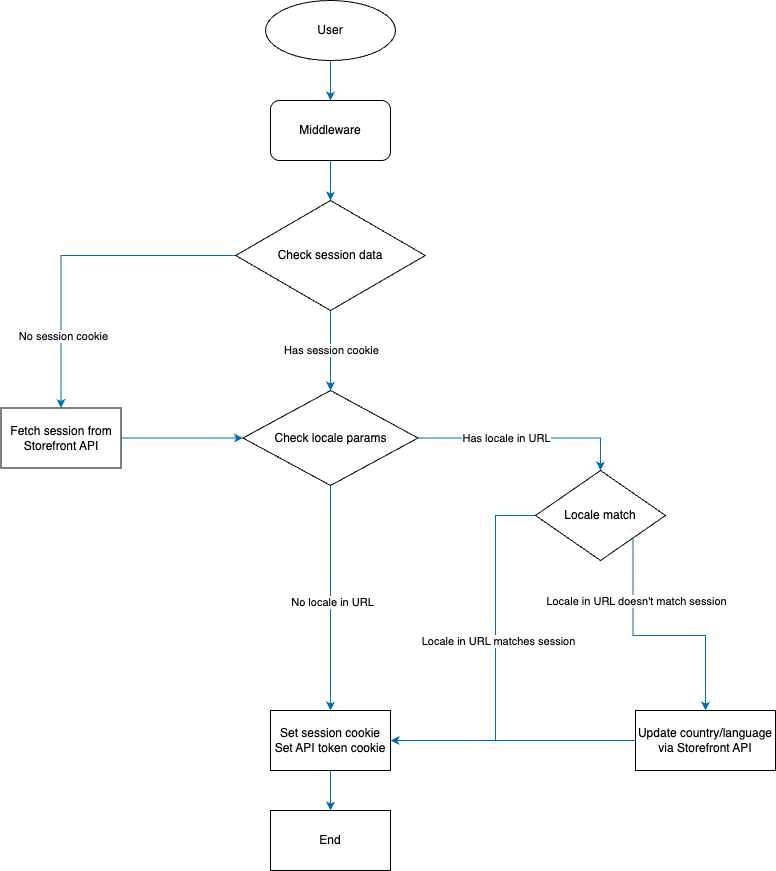
Product details page
Product details page is rendered in few steps:
- Fetch product data that is important for the page to render immediately.
- Render the page with the data fetched in step 1.
- Fetch related products.
- Stream the related products list to the page.
 Loading state during streaming.
 Fully loaded product details page.
Page prefetching
While a user scrolls through a product listing, visible products' data are prefetched automatically. Only the static, long cached portions of the page is prefetched on server side, so Storefront API shouldn’t be under heavy load because of this.
Cart management & checkout
Cart management and checkout is done on the client side. Cart and checkout data is cached in the front-end (using React Query), but they are invalidated on mutations, switching between tabs, regaining internet connection etc.
Checkout is divided between address, delivery and payment steps. This is to ensure users do not edit address during payment and reduce conflicts.
Final step of checkout is managed on server side. After a successful payment response, server will check the payment status and redirect user to a confirmation page where the last successful order data is displayed. Otherwise, user is redirected to a failure page.