Integrating with a CRM
Overview
Integrating Centra with a marketing automation platform that offers CRM and loyalty program features can significantly enhance customer engagement and data management capabilities. This integration facilitates the seamless exchange of data between Centra and the external platform, enabling functionalities such as:
- Transferring customer data from Centra to the platform to maintain a comprehensive customer view.
- Sending order data from Centra for advanced segmentation and targeted campaigns.
- Triggering transactional emails based on specific customer actions.
Please note that, depending on the platform's capabilities, it may not be possible to transfer customer data from the external platform back into Centra.
Integration Options
There are two primary methods to integrate Centra with an external marketing automation platform:
- Standard Integration Plugin: Utilize Centra's pre-built integration plugin designed for common workflows. This option provides a quicker setup for standard integration needs.
- Custom Integration: Develop a tailored connection between Centra and the platform to meet specific business requirements. This approach allows for the inclusion of additional third-party systems, such as Point of Sale (PoS), loyalty programs, Enterprise Resource Planning (ERP) systems, or other CRM platforms.
Features of the Standard Integration Plugin
The standard integrations plugins typically supports the following functionalities:
-
Customer Data Transfer: Automatically send customer data to the external platform during the first transaction. Subsequent updates in Centra do not overwrite existing information in the platform.
-
Newsletter Subscription Sync: Synchronize newsletter subscription statuses between Centra and the platform.
-
One-Time Data Synchronization: Initiate a bulk data sync for all records created after a specified date, including:
- Customer data
- Order data
- Shipment data
- Returns data
- Newsletter subscriber data
-
Promotion Redemption: Mark promotions as redeemed in the platform when an order is placed in Centra. This involves:
- Submitting a promotion ID through Centra’s APIs during order placement.
- Logging the redemption status in the order history within Centra.
- Storing the promotion ID in Centra for reference.
-
Transactional Email Triggers: Trigger the external platform to send transactional emails based on events such as:
- Order creation
- Payment success or failure
- Shipment dispatch
- Returns processing
- Order cancellation
- Password recovery
Setting Up standard ESP & CRM Integrations connection in Centra
1. Accessing the plugin settings
- Log in to your Centra.
- Navigate to Stores management > select the store > scroll down to plugins section at the bottom.
- Locate the standard provider plugins for Email & CRM Integration:
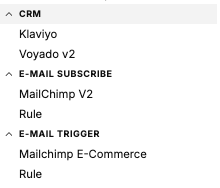
2. Connecting an ESP or CRM
- Add & save the plugin when you have filled out all the details necessary for your integration.
- Required credentials, instance domain, API keys, authentication tokens, or webhook URLs.
- Configure the synchronization/transfer settings according to your preferences.
- Test the connection to ensure successful integration.
Choosing Between Custom Integration and Standard Plugin
| Custom Integration | Standard Integration Plugin |
|---|---|
| Provides full control over data transfer and transformation processes. | Suitable when the plugin's predefined integration flows and features meet your requirements. |
| Allows for complex integrations involving multiple systems beyond Centra and the external platform. | Ideal for straightforward, point-to-point integrations between Centra and the platform. |
For more detailed information on how to integrate Centra with external platforms, please refer to Centra's public API documentation.