Ingrid v2
Ingrid is a shipping platform integrated with Centra to offer rich shipping options, including multiple delivery providers, address search, free shipping voucher support, and more.
Version 2 adds an optional address form for collecting and validating customer addresses, designed to handle regional address formats for delivery processing.
To enable the address form feature, contact Ingrid support.
Plugin Configuration
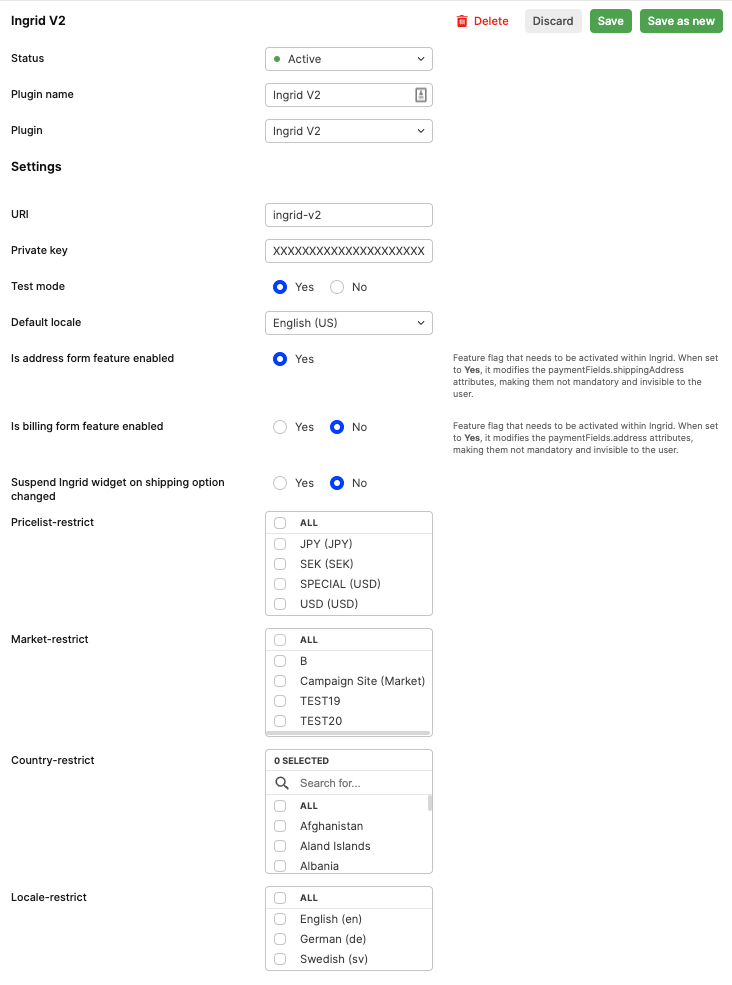
To enable Ingrid, the first step is to configure the Ingrid plugin. This is done under System > Stores.
The minimum requirements are the following:
A properly formatted, non-base64 encoded private key
Default locale selected
Plugin is set to active
These plugin settings impact the integration as follows:
- Test: Set to "yes" to connect Centra to Ingrid's staging environment, or "no" for the production environment.
- Default Locale: Defines the widget's default language. If a proper locale is set on the selection, Centra will instruct Ingrid to use it. If unsupported, the default locale is used.
- Is Address Form Feature Enabled: Enabled by default (set to "yes"). Confirms the address form is active for your Ingrid account, allowing customers to input delivery details in the widget. Address updates are sent to Centra via the CheckoutScript, which handles client-side events.
- Is Billing Form Feature Enabled: Set to "No" by default. If set to "Yes," it confirms the billing form is activated for your Ingrid account. To enable it in Ingrid, contact Ingrid support. The feature adds a "Billing to" section and a "Same as delivery" checkbox in the widget. If checked, the billing address matches the delivery address; if unchecked, a separate billing form appears for customers to provide billing details. Address updates are sent to Centra via the CheckoutScript, which handles client-side events.
- Suspend Ingrid Widget on Shipping Option Change: Set to "yes" to put Ingrid's widget into a "loading state" when the shipping option is changed by the user, until Centra receives the update. Ensure your frontend picks up these changes and resumes the widget when ready.
- Restrict Pricelists: Limits the plugin to the selected pricelist(s); leave empty to apply to all.
- Restrict Markets: Limits the plugin to the selected market(s); leave empty to apply to all.
- Restrict Countries: Limits the plugin to the selected shipping countries; leave empty to apply to all.
- Restrict Locale: Limits the plugin to the selected locale(s); leave empty to apply to all.
Integration Workflow
Session Initialization Prerequisites:
- The Ingrid v2 plugin is configured and activated on the store linked to the selection.
- The selection contains at least one line item.
- Locale, market, pricelist, and country requirements configured in the plugin are met.
Centra saves the initialized Ingrid session ID and updates the shipping price based on Ingrid's setup.
When does Ingrid update Centra?
During checkout, the Centra Checkout Script listens to events from the Ingrid widget and forwards them to Centra.
Events Tracked by Centra's Checkout Script:
- "summary_changed" Event: Triggered by updates to summary details, like delivery or billing address changes. Centra's script sends an
ingrid_v2_address_changeevent request to reflect these updates. - "data_changed" Event: Triggered by modifications in checkout data. The script tracks key attributes, including:
delivery_type_changedexternal_method_id_changedprice_changedsearch_address_changedshipping_method_changedsearch_address_changed
If any of these attributes change, an ingrid_v2_shipping_option_changed event request is sent to Centra.
Fallback Form During Ingrid API Unavailability
Centra provides a fallback form to ensure uninterrupted checkout when the Ingrid API is unavailable.
Scenarios for Fallback Form Usage:
The fallback form appears in these cases:
- Adding an item to an empty selection.
- Updating the selection.
- Changing the shipping/billing address.
- Changing the shipping option.
In these situations, Centra includes visible address and shippingAddress fields in the paymentFields response. The frontend should use these fields to build the fallback form.
The Ingrid data in selection.checkout.widgets, in the response includes the following object:
{
  "__typename": "IngridWidget",
  "deliveryOptionsAvailable": false,
  "ingridAttributes": null,
  "kind": "SHIPPING",
  "snippet": ""
}
Frontend Implementation
Scenario 1: Address Form Feature Enabled in Ingrid
- Load the Ingrid widget on the frontend.
- Customer enters their address in the widget, or it is pre-filled by Ingrid if previously stored in Ingrid's address book.
- Address update generates a CheckoutScript event, which needs to be caught by FE and saved to your shopper's session using the
handleWidgetEventmutation
In this setup, the address from Ingrid is saved on the order in Centra.
Scenario 2: Address Form Enabled in Ingrid + "Address After Payment" (PayPal / KCO / Qliro)
In "Address After Payment" mode, the address on the order in Centra comes from the PSP widget. For PayPal, this is the customer’s PayPal address. For solutions like KCO or Qliro, if an address was entered in Ingrid, Centra attempts to pre-fill the PSP widget with that information.
Operating in this mode may result in different addresses on the order in Centra and Ingrid, as the PSP widget's address form typically cannot restrict customer input (except with Qliro's "Lock customer information" option).
Example Flow:
- Ingrid widget loads on the frontend.
- Shopper fills in the address in the widget, or it’s pre-filled by Ingrid if previously stored.
- Address update is sent from Ingrid to Centra via client-side events and Centra CheckoutScript.
- Centra initiates the KCO session and pre-fills the address from Centra.
- Shopper submits the address in KCO.
- Shopper finalizes the payment in KCO.
- Order is created in Centra with the address information from KCO.
Address Flow: Ingrid → Centra → KCO.
If the customer changes the address in KCO, the updated address from Klarna is the one saved in Centra.
Sending updates from Ingrid's widget to Centra
The Ingrid widget provides a client-side API for handling changes within the widget.
Centra offers a checkoutScript, which wraps this API and exposes events to listen to and forward to Centra. This script is included as selection.checkout.checkoutScript. If the script is present in the response, embed it into the DOM on your checkout page. It will then be accessible via window.CentraCheckout.
Important: Ensure the widget has loaded properly before interacting with it, as its exposed object on the browser's window must be present.
In addition to that you need to register an eventListener for centra_checkout_callback, where the callback should forward the event.detail data using mutation handleWidgetEvent.
const sendEventToCentra = async e => {
  const payload = e.detail;
  const res = await fetch(apiUrl, {
    method: 'POST',
    body: JSON.stringify({
      query: `
             mutation HandleWidgetEvent($payload: Map!) {
                  handleWidgetEvent(payload: $payload) {
                       selection {
                            ...SelectionWithCheckoutFields
                       }
                       userErrors {
                            message
                            path
                       }
                  }
             }`,
      variables: {
        payload,
      },
    }),
  });
  //update your FE based on res
  window.CentraCheckout.resume(e.detail.additionalFields.suspendIgnore);
};

document.addEventListener('centra_checkout_callback', sendEventToCentra);
Reflecting Backend Updates in the Ingrid Widget
Centra sends all cart updates to Ingrid, requiring the widget to reload data from its backend. To manage this, use the window.centraCheckout.suspend() and window.centraCheckout.resume() methods before and after backend calls that modify the cart.
Cart modifications include:
- Changing order items (quantity/removal).
- Adding a "cross-sell product."
- Adding/removing a voucher.
- Updating the address via mutation paymentInstructions when initiating a payment widget through the address form.
Example:
const itemUpdate = async (item, quantity) => {
  window.centraCheckout.suspend();
  await api.lines.linesUpdate({ item, quantity }, { token: getToken() });
  window.centraCheckout.resume();
};
Limitations
Subscriptions
Ingrid v2 integration does not currently support subscriptions. When a subscription is added to the basket, the Ingrid v2 widget will not load during checkout to avoid conflicts with the subscription management process.