Cart Abandonment
As e-commerce platform, we understand how unfortunate it is when people almost make a purchase. Some people are distracted, some can't find their credit card at the moment, for others their device battery just died. Some of them could forget to retry the purchase later, unless you reminded them. Cart Abandonment allows you to do just that - pick up where the shopper has left off the checkout process, even if they are on a different device.
What is required to enable Cart Abandonment?
Cart Abandonment is currently supported through either Rulemailer or Klaviyo CRM. For any payment method other than Klarna Checkout, you will only need to configure:
- Your payment plugin of choice,
- CMR plugin itself -
RuleorKlaviyo, - Corresponding CA automation in Rule app or Klaviyo portal,
- Additional Front End change to support recovering cart based on selection ID.
If you're using Klarna Checkout for payment, you will need to configure the following items:
- Klarna Checkout v3 payment plugin,
Ruleemail plugin orKlaviyoCRM plugin,- CA automation in Rule app or Klaviyo portal,
- Additional Front End changes to support event signalling between your webshop, Klarna plugin and Centra CheckoutScript,
- Additional Front End change to support recovering cart based on selection ID using CheckoutScript
How does Cart Abandonment feature work?
In short, as soon as you collect shopper's email address during checkout, you can save it on their selection together with parameter "cartAbandonmentEmail": true parameter. As long as CA setup is enabled in your CRM plugin, this will send the shopper's details to your CRM, starting the cart abandonment flow.
In your CRM, you should create an automation that will trigger when a subscriber with cartAbandonmentEmail is received. This automation should wait the pre-defined period of time (much longer than it usually takes to complete a payment) and then trigger a Cart Abandonment e-mail to your subscriber, based on the pre-defined template. If the order is completed before the timer is up, the CA tag will be removed from the subscriber, and so the e-mail will not be triggered.
Additional Front End configuration
Recovering customer cart using the selection ID
To properly recover customer's selection, the following logic should be added to your webshop, so that you can restore customer's abandoned basket:
- CA link in your CRM plugin configuration should point to, for example:
https://brand.my/cart/{selection} - When visited, your frontend must extract the selection ID, at which point it can be attached to the current customer session using setSelection mutation.
- User should then be redirected to
https://brand.my/checkout(orhttps://brand.my/selection, enter your checkout page address here) with the proper list of products from the abandoned selection. - From there, checkout and payment are completed as usual, creating an order in Centra.
It is possible that the original products are out of stock, but that should be handled as usual during the checkout step, when paymentInstructions mutation call does stock check and updates the selection accordingly.
We recommend that the .../cart/ page should not be tracked by robots, so that the selection IDs are not exposed.
Centra CheckoutScript - what is it?
This is only required when using Klarna Checkout. If you're using another payment method, you can skip this chapter and scroll down to your CRM plugin configuration.
In the selection response, if Klarna Checkout is active on the selection, Centra will return an element called centraCheckoutScript. It registers an event for events triggered by the widgets which need to be passed down to Centra, and convenience functions for suspension and resume of the widgets.
If you get the centraCheckoutScript in the selection response, you should add it to your page so that it is picked up.
Centra CheckoutScript Events
Embed the script onto your page. You will also need to add an eventlistener for centra_checkout_callback, the job of that is to send the events it picks up back to Centra.
Below is an example of how the EventListener can look, where var url is your endpoint to which you POST the updates to mutation setAddress:
document.addEventListener('centra_checkout_callback', function(origdata) {
    var url = '{your-storefront-api-endpoint}'
    $.ajax(url, {
        method:"POST",
        data: origdata.detail,
        success: function(data) {
            // Ajax update data from response
            CentraCheckout.resume(origdata.detail.additionalFields.suspendIgnore);
        }
    });
});
CA flow using Klarna Checkout as payment
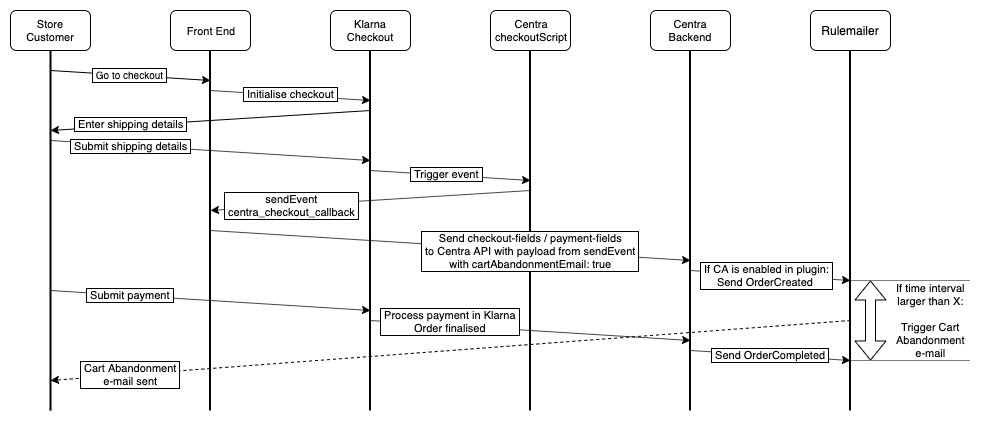
- Store customer finishes selecting products, goes to checkout,
- Your webshop initialises KCO plugin, which is returned together with Centra CheckoutScript that should be embedded on your website,
- The customer enters shipping details and submits them,
- KCO plugin receives the shipping details update and triggers
shipping_address_changeevent, which is caught by the Centra CheckoutScipt, - CheckoutScript triggers
centra_checkout_callbackevent, which needs to be caught and processed by your website, - Your website calls
setAddressmutation with:"shippingAddress"."email": "test@example.com"and"cartAbandonmentEmail": true, - If Cart Abandonment is enabled in your CRM plugin, Centra will trigger an update with a tag
orderCreated, that starts a countdown to a pre-defined time interval for this shopper, - In the meantime, the store customer proceeds to payment, this is the step that might be interrupted.
- Once payment is completed, Centra will notify the CRM that checkout was successful, which stops the countdown initialised in step 7,
- Finally, depending on the timing:
a. If the time between orderCreated and orderCompleted is lower than the time interval set up in your Rule config, the order completes as normal and the store customer receives standard "Order receipt" e-mail.
b. Otherwise, after the pre-configured time internal is up, the store sends a "Cart abandoned" e-mail to the customer.
CA flow using other payment methods
With other payment methods you don't need to use the CheckoutScript, so the flow is slightly less complex.
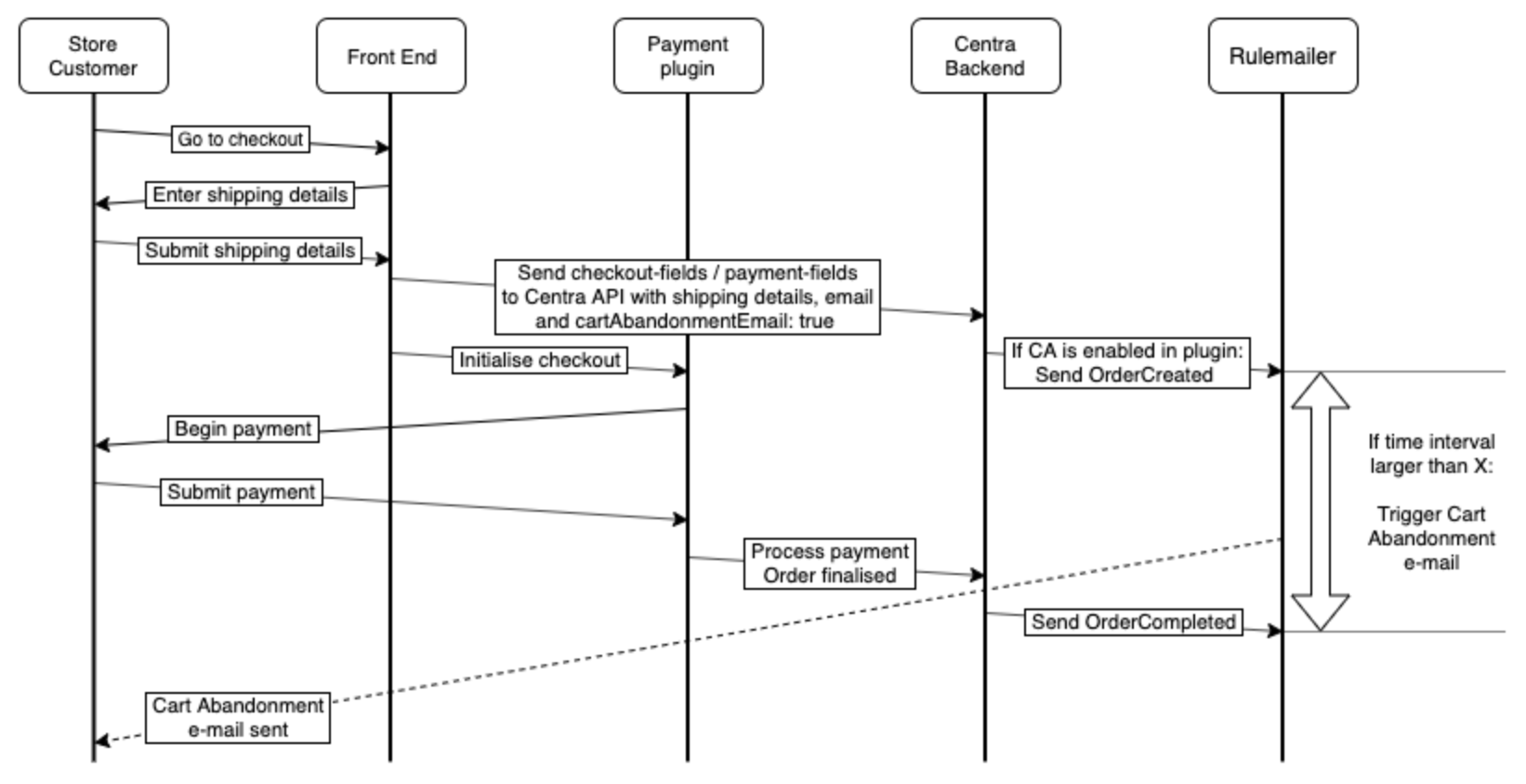
- Store customer finishes selecting products, goes to checkout,
- The customer enters shipping details and submits them,
- Your website calls
setAddressmutation with:"shippingAddress"."email": "test@example.com"and"cartAbandonmentEmail": true, - Centra triggers an update to the CRM with a tag
orderCreated, that starts a countdown to a pre-defined time interval, - In the meantime, the store customer proceeds to payment,
- Once payment is completed, Centra will notify the CRM that checkout was successful, which stops the countdown initialised in step 4,
- Finally, depending on the timing:
a. If the time betweenorderCreatedandorderCompletedis lower than the time interval set up in your CRM config, the order completes as normal and the store customer receives standard "Order receipt" e-mail.
b. Otherwise, after the pre-configured time internal is up, the store sends a "Cart abandoned" e-mail to the customer.
Rulemailer plugin configuration
Assuming you've already configured Rule email plugin with your credentials, only additional configuration required is to:
- Enable Cart Abandonment (tag
orderCreated): should be set to Yes, - Enable Order Receipt (tag
OrderCompleted): should be set to Yes, Cart link: should be set to the URL your webshop uses for cart abandonment, e.g.https://brand.my/cart/{selection}
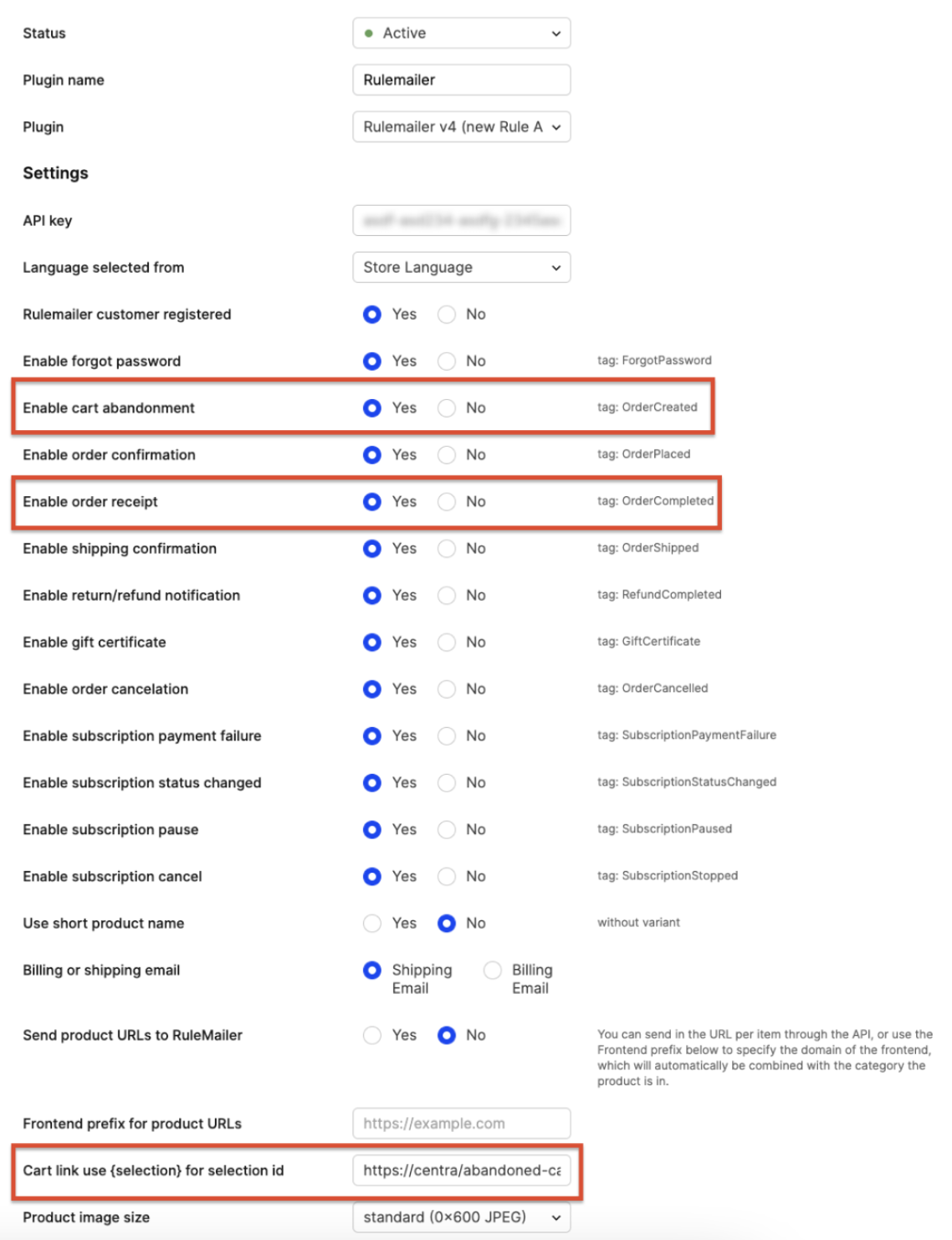
Additionally, in your Rule configuration panel you should set the time interval it takes for CA e-mail to be triggered after receiving orderCreated tag, if orderCompleted is not received. Make sure this interval is not immediate, but the specific time is up to you - it might be one hour, six hours or even one day.
Rule app configuration
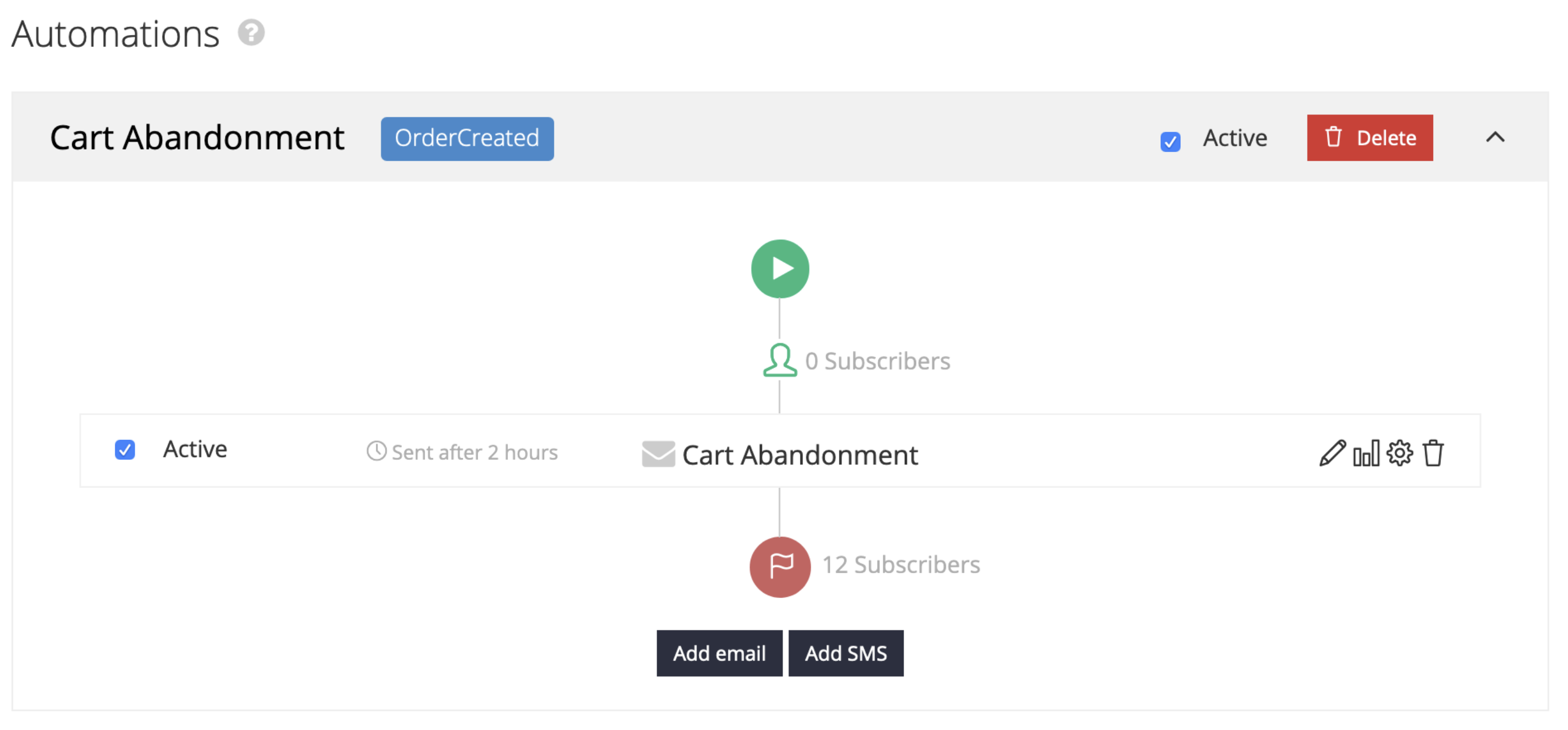
In your account in Rule, you need to add a simple automation which will trigger on the order tag orderCreated and start the timer until sending the CA e-mail. You can attach this automation to any e-mail or SMS template in Rule. You don't need to act on receiving orderCompleted tag, which is sent when the payment was successful and order was completed. Rule will automatically remove the orderCreated tag from the subscriber when that happens, so the CA e-mail countdown will be stopped. Finally, you should decide how quickly you will trigger the Cart Abandonment e-mails.
Klarna Checkout v3 configuration
KCOv3 plugin should be configured according to the instructions found in Klarna Checkout configuration guide.