Best practices
Caching schemes for Storefront API
-
Client-side caching: Responses are cached in the browser to reduce network traffic and improve performance.
-
Server-side caching: A cache layer before the application server reduces backend requests and improves response times.
-
Edge caching: Caching is done at the network edge, such as a CDN, to reduce latency and offload traffic from the origin server.
-
Hybrid caching: Combination of client-side, server-side, and edge caching for optimal performance and scalability.
Each of these caching schemes has its own advantages and trade-offs.
Use webhooks for cache invalidation
Webhooks can be used for cache invalidation by sending a request to a cache server whenever a change occurs in the data source, which triggers the cache server to invalidate its cached version of the data and retrieve a fresh copy. This allows for real-time updates to be reflected on the cached data without the need for manual intervention or scheduled cache refreshes.
Example flow
-
Edit product name in AMS
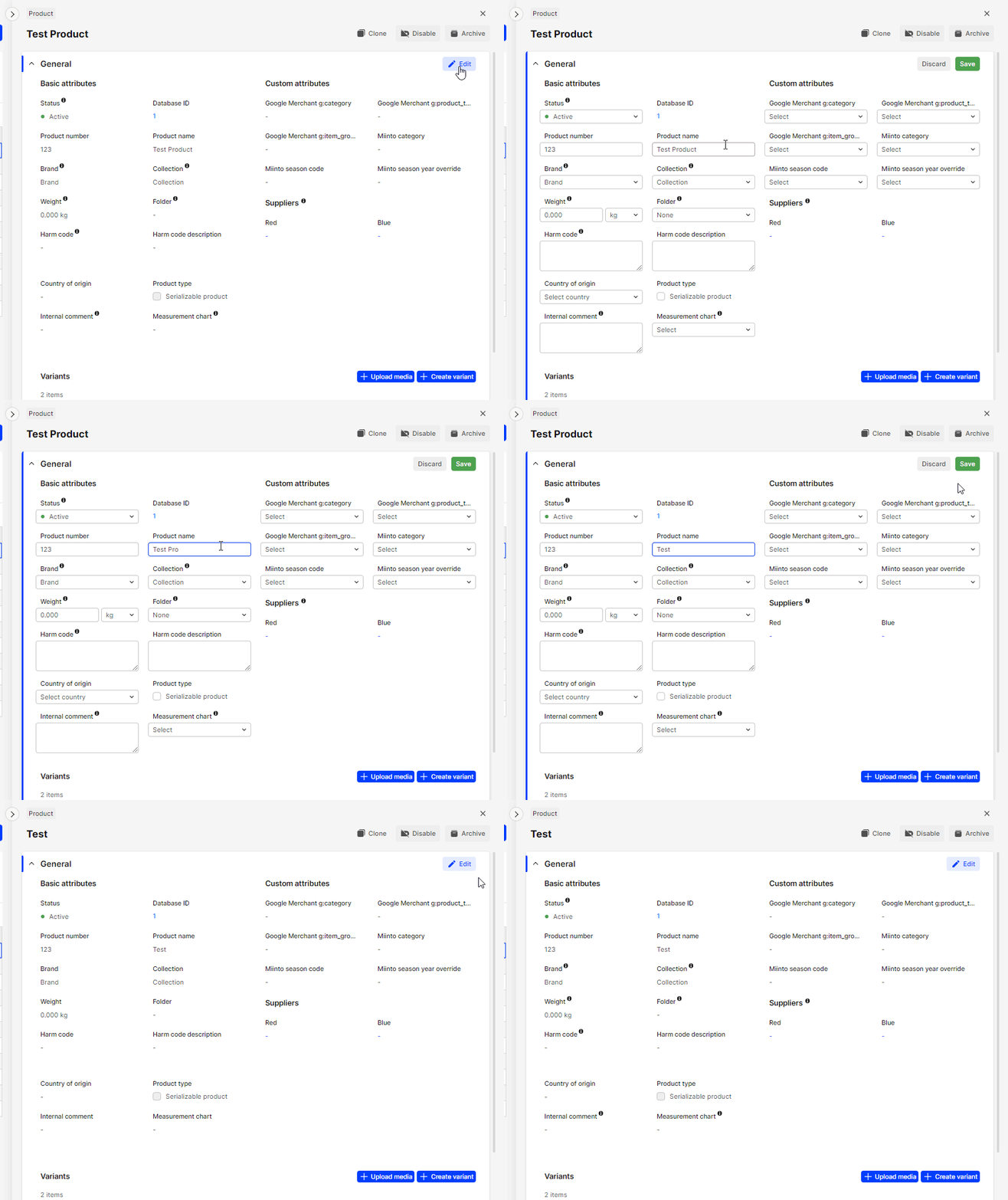
-
Payload received at configured webhook url
 POST /configured/webhook/url HTTP/1.1
 Host: your-backend.eu
 Content-Length: 36
 Accept: */*
 Content-Type: application/x-www-form-urlencoded
 X-Centra-Signature: t=1759484128,v1=be9ff3e9ce93131938dbaf88e953a3f242da72e8941369421b2d99b9a8080484
 Accept-Encoding: gzip

 payload=%7B%22DisplayItems%22%3A%5B%2295%22%2C%2225%22%2C%2231%22%2C%2233%22%2C%2295%22%2C%2295%22%5D%7D
Raw parsed data:
{ "DisplayItems": ["95", "25", "31", "33", "95", "95"] } -
Payload from this webhook can be directly used in
displayItemsquery to get the updated data:query webhookDisplayItems($displayItemIds: [Int!]!) {
displayItems(where: { id: $displayItemIds }) {
list {
id
name
relatedDisplayItems {
relation
displayItems {
id
}
}
}
}
} -
In similar fashion, you can receive and easily parse webhooks about categories and other frontend related changes:
query webhookCategories($categoryIds: [Int!]!) {
  categories(id: $categoryIds) {
    list {
      id
      name
      childCategories {
        id
      }
    }
  }
}
Webhook repeating explained
Webhook retrying refers to the process of attempting to resend a failed webhook request multiple times, in case the first attempt failed due to a temporary error, such as a network issue or a server timeout. The retrying mechanism is typically implemented in the webhook sender, and it works by resending the same request to the receiver endpoint after a specified interval, until either the request is successfully delivered or the maximum number of retries is reached. The retrying logic can be configured to adjust the retry interval, the number of retries, and the conditions for determining if a retry is necessary. Retrying helps to ensure that important data is not lost and that the receiver can receive the latest updates in a timely manner.
How to enable webhook repeating in Centra:
- go to webhook plugin settings
- enable
Number of retries after failuresetting
More on it here.
Restrictions
Using IP filtering on the integration side isn't a reliable security measure because the IP address of the Centra webhook can change anytime. Our application scales according to its requirements, leading to dynamic IP addresses. This makes the traditional static IP filtering ineffective for security purposes.
Mechanism for rebuilding the whole cache
A mechanism to rebuild the whole cache may be necessary in scenarios where the cache becomes stale or invalid due to network issues preventing the reception of webhooks, leading to outdated data being served. This can result in inconsistencies in the data that is being served, which can lead to incorrect or unexpected results. A mechanism to rebuild the cache from scratch, also known as cache rebuilding, can address this issue by allowing the cache to be recreated from the original data source.
Cache rebuilding can be triggered manually, such as through an administrative interface, or automatically, such as through a scheduled task or when certain conditions are met, such as the detection of stale data or a failure of the webhook mechanism. This ensures that the cache remains fresh and consistent with the underlying data, even in the face of network issues or other unexpected events.
It's worth mentioning that Centra's webhook implementation does not guarantee that all webhooks will be delivered and does not guarantee the specific order of those webhooks. For this reason it is necessary to prepare a mechanism for whole cache rebuilt. The rebuilt might take some time and for that time the old cache should be used, until the rebuild is done. Then after completion the out-of-date cache should be swapped for an up-to-date one.
Requirement of caching for larger clients
Caching is required for large datasets because it helps to reduce the load on the data source and improve the performance of the system by storing a copy of the data in memory. When a request is made for data, the cache can be quickly checked to see if the requested information is already stored. If it is, the cached data can be returned without having to retrieve the information from the original data source, which can be time-consuming, especially for large datasets.
Caching can significantly improve the response times for applications that deal with large datasets, as it eliminates the need for constant trips to the data source, and reduces the amount of data that needs to be transferred over the network. By reducing the amount of data that needs to be transmitted and processed, caching can also help to reduce the load on the underlying systems, which can improve the overall stability and reliability of the system.
Since Storefront API offers both plugins for backend (no-session mode) as well as frontend functions (session mode), proxying of your API calls should not be required. Please be careful not to use the no-session API directly in the browser, as it may lead to security breaches.
How caching can avoid limiting the API requests in the future?
Caching can help to avoid limiting the number of API requests by reducing the number of requests made to the API. Many APIs have rate limits that restrict the number of requests that can be made within a specified time period. This is done to prevent overloading the API server and to ensure that the API remains available to all users.
By caching the API responses, subsequent requests for the same data can be served from the cache, instead of making a new request to the API. This reduces the number of API requests and helps to avoid exceeding the API's rate limits. Additionally, serving data from the cache can also improve the response time, as it eliminates the need to wait for a response from the API server. This can improve the user experience and make the application more responsive.
Caching can also help to conserve bandwidth, as it reduces the amount of data that needs to be transmitted over the network. This can be especially important for applications that rely on API data and need to make frequent requests. By reducing the number of API requests, caching can help to ensure that the application remains within the API's rate limits and that the API data remains available and reliable.
Although Storefront API is not rate limited right now we might add that limitation in the near future and then the caching will be a requirement. Implementing the caching of your own can help you prepare for any future API rate limiting that will be imposed.
Webhook handling
The webhook handler should only receive, validate, and save the request. Process cache updates asynchronously to ensure correct operation and reliable triggering.
Overall this approach can improve the scalability, reliability, and maintainability of your system.
To do that you should:
- As fast as you can after receiving the webhook:
- log it
- verify
- enqueue a job for the recache
- Process jobs in separate process than webhook handler
Be sure to throttle webhook job processing to avoid future API limiting. This will help prevent overloading the API server and ensure the stability and reliability of the system.
Exposing shared secret
Never expose shared authentication keys publicly, as this compromises security.
Shared secrets are used to grant access to protected resources and to verify the identity of the client. If a shared secret is exposed, it can be used by unauthorized entities to gain access to the protected resources, potentially leading to data theft, manipulation, or other malicious activity.
This is why you should never use no-session Storefront API directly in browser as this will lead to exposing the shared secret, unless requests are proxied by your backend.
When we confirm exposing a shared secret (i.e. by detecting a direct browser usage) we will revoke the questioned key, rendering it useless for the intended purpose. This can result in downtime, loss of data, and other adverse effects.
Secret rotation will be required in such case.
Rotating the secret
Secret rotation helps reduce the risk of a shared secret being compromised.
By rotating secrets regularly, you reduce the amount of time that a secret is in use and increase the likelihood that any compromise will be detected and addressed before it can cause significant harm. This helps to ensure the continued security and reliability of your system.
Additionally, rotating secrets can help to mitigate the risk of exposure due to misconfiguration or human error, such as leaving a secret in a public repository or in a codebase that is accessible to unauthorized parties. By rotating secrets, you limit the exposure of any given secret, reducing the potential impact of a security breach.
Pagination
Pagination divides large datasets into smaller chunks (pages). Use pagination to efficiently retrieve and process data without overwhelming the API or client.
APIs often deal with large amounts of data, such as lists of products, images, or other information. Retrieving all of this data at once can cause performance issues for both the API server and the client, as it can result in slow response times, increased network traffic, and increased memory usage. In some occasions it can also trigger server side failures due to memory exhaustion.
Pagination solves this problem by allowing the API to return only a portion of the data at a time. The client can then request additional pages of data as needed. This reduces the amount of data that needs to be transmitted and processed at any given time, improving performance and reducing the risk of errors or failures. It allows the client to retrieve only the data it needs and to process the data in a way that is most efficient for their use case.
Pagination is prerequisite in product listing, otherwise the responses might miss products or return errors.
Example paginated request to products query:
{
  "page": 1,
  "limit": 20,
  "market": 1
}
Keep limits low
It is recommended to use low limits when paginating for several reasons:
- Performance: it reduces the amount of data that needs to be transmitted and processed at any given time, improving the performance of the API server and client.
- Scalability: it allows the API to scale to handle larger amounts of data and clients without sacrificing performance or efficiency.
- User experience: Low limits allow the client to retrieve data in small, manageable chunks, improving the user experience and reducing the risk of errors or timeouts.
- Error handling: In the event of an error or timeout, low limits allow the client to easily resume data retrieval from the last successful page, reducing the need for manual error handling.
You should always specify a reasonable page limit. We might enforce the maximum number of elements per page in the future.
Keep response size small
There is no strict limit to the maximum size of a REST API response, but it is generally recommended to keep response sizes small to improve performance and avoid timeouts.
Preventing updates during payment processing
This guide aims to explain the proper use of the paymentResult mutation in the Storefront API, which is called after payment has been submitted by the customer in the checkout.
It also aims to ensure understanding of potential risks posed by improper implementation and minimizing their impact.
paymentResult mutation
This mutation is called from frontend side on the success page as a result of a redirect from the Payment Service Provider after the customer has submitted a payment successfully. Using this mutation correctly is crucial as it triggers the successful completion of the payment process and order placement in Centra.
Preventing updates during processing result of the payment
It's important to note that following the completion of the payment process, all kinds of updates to the selection must be prevented due to their potential to introduce inconsistencies between the state of the selection in Centra and state of the order on PSP side. The time slot during which updates should be prevented is marked red on the below diagram.
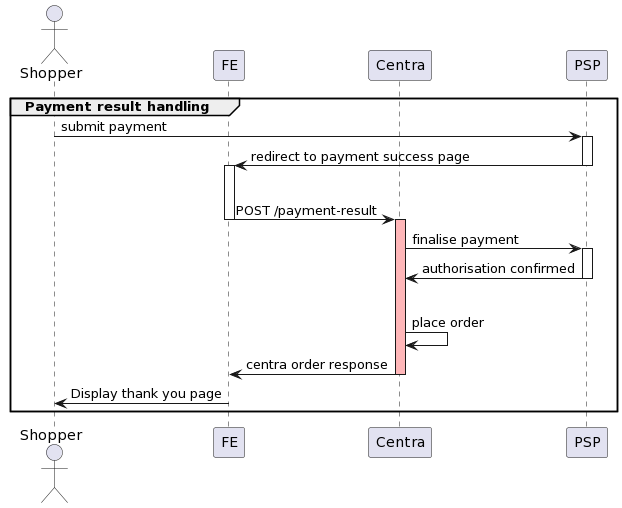
For instance, a situation may arise where a customer leaves the payment success page before the response from POST /payment-result request is processed, triggering one of the example scenarios:
- update of the selection's country to a different one than the one used in the checkout
- update of the selection's currency to a different one than the one used in the checkout
- update of the selection's shipping method to a default one which was different than the one used in the checkout
These updates are often not a customer's intention but a default behaviour of a website e.g. redirect to a default market which is different from the one that customer proceeded to the checkout with. In such case, Centra will accept an update as the selection is still open.
These kinds of updates can cause a discrepancy between state of the order on the PSP side and the state of the order in Centra. As a result, order would be placed in Centra with a currency or amount mismatch, customer could be charged without an order placed in Centra due to an error.
Handling campaigns and promotions
There are some special cases that you might consider when it comes to promotions and campaigns handling:
Planning campaigns for the future
Instead of creating an inactive campaign, and later activating it when promotion period starts, you may want to configure your campaigns with:
- Status:
Active Startdate set to the date and time when the campaign should begin.
Vouchers and campaign expiration dates
Similar to campaigns, vouchers in Centra have both Start and Stop timestamps. This limits the date and time when the voucher can be added to your selection. However, once you have added a discounted item to your selection, Centra will not remove the discounted price after the promotion period is over. That means, if your shopper was able to add a discounted item before the promo ended, Centra will allow them to check out with that basket.
This mechanism means that you may expect to see some orders placed after the campaign/voucher was expired, but using discounted prices. This is how Centra was designed to work. If you'd like to avoid that, you must refresh all FE sessions in your webshop after the promotion is over. Otherwise, open selections with discounted prices will still be possible to check out, until the session expires and a new selection is created.