URIs
URL (Uniform Resource Locator) provides a standard way to identify and locate resources on the Internet. In Centra, we define URI, which is the variable part of a URL, to access the following resources:
- Brands
- Campaigns
- Categories
- Collections
- Product Displays
- Localization
URIs can be changed and used to improve SEO optimization.
In Centra users can manipulate URIs using AMS or APIs.
URIs in AMS
- Creating (editing) URI in Centra:
In order to create or edit, for example, a Brand, users can go to: GENERAL / BRANDS.
There they can fill the Brand's name, URI, and other fields.
URI can contain basic Unicode characters (without emojis). Some basic sanitization will still be applied if a URI is provided, to get rid of reserved characters with a defined role. In particular, slashes, question marks, hash signs, etc. are be removed. Other characters are fine, but will be URL-encoded when returned via frontend APIs.
If a URI is not provided, Centra will try to generate one:
- The brand name will be used for generating URI.
- Language-specific letters (diacritics) will be converted/transliterated to latin counterparts if possible.
- All other characters will be removed or replaced with a dash.
- Localization of URIs in Centra
URIs for product displays can be updated under translations: System / Translations / Product
Also, when translations are imported, URI can either be provided explicitly, or can be generated automatically.
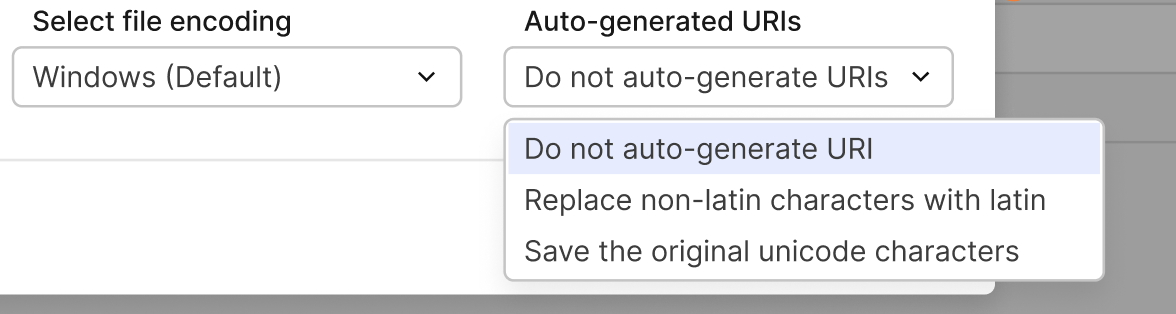
- When 'Do not auto-generate URIs' is selected — no URI is auto-generated for translated displays/categories.
- When 'Replace non-latin characters with latin' is selected — the URI is generated with latin characters for translated displays and categories → generated based on names (translated display name, category).
- When 'Save the original unicode characters' is selected — the URI is auto-generated with Unicode characters for translated displays and categories → generated based on names (translated display name, category).
URIs in GraphQL Integration API
GQL Integration API works in a bit different way: we validate the input, but don't sanitize it. If a request
contains invalid characters, validation will fail. That's one of the reasons why it's required to select userErrors
in the response payload, and it's best to include userWarnings too.
userErrors { message path }
userWarnings { message path }
Here's an example GraphQL mutation for creating a Display with a specific URI:
mutation createDisplay {
  createDisplay(
    input: {
      product: { id: 14 }
      store: { id: 1 }
      status: ACTIVE
      name: "Pchnąć w tę łódź jeża"
      uri: "シऌēźç"
    }
  ) {
    display {
      id
      name
      uri
    }
    userErrors {
      message
      path
    }
    userWarnings {
      message
      path
    }
  }
}